
Categories
Domain appraisals Domain market

What Actually Drives a Domain Appraisal

Type a name into a domain appraisal tool and it spits out a number, $1,200, or $47,000, or $85. Where does that come from? It can look like a slot machine, but a domain valuation is mostly a small set of understandable factors, weighted and then anchored to real sales of similar names. Once you can see the factors, the numbers stop being mysterious and start being arguable, which is exactly what you want when you’re buying, selling, or naming something.

Here’s what actually goes into the reasoning.

The one factor that dominates everything: comparable sales

Before the individual attributes, understand the anchor. A domain is worth what similar domains have actually sold for. Every serious appraisal, human or automated, is ultimately a comparison to a dataset of real transactions (Sedo, Afternic, GoDaddy Auctions, NameBio’s public sales archive, and so on).

The attributes below matter because they predict which sales your name is comparable to. Short, dictionary-word .coms cluster in one price band; long hyphenated names cluster in another. An appraisal is really answering: “which pile of past sales does this name belong to, and where in that pile?” Keep that in mind, it’s why two names with identical “scores” on paper can be valued very differently once real comps are pulled in.

Length: shorter is worth more, sharply

Length is the single most legible driver, and its effect is steep.

  • Ultra-short (1–4 characters). The premium tier. Three- and four-letter .coms (LLL.com, LLLL.com) and short numeric names have their own established markets and floor prices, a random pronounceable LLLL.com has a known baseline in the low thousands, purely for its length and scarcity. There are only so many of them; scarcity does the work.
  • Short (5–8 characters). Still valuable, especially if it’s also a real or brandable word. This is where most premium brandable names live.
  • Medium (9–15). The vast middle. Value now depends heavily on what the word is, not just how long.
  • Long (15+ / multiple words). Value drops fast. Long, multi-word domains are cheap unless the phrase itself is high-intent (see keywords below).

Rule of thumb: every character you add makes a name a little less memorable, less typeable, and less scarce. Length compresses value from both ends, memorability and rarity.

TLD: .com is still the gravity well

The extension may be the second-biggest factor after length.

  • .com is the reference standard. It commands a large premium over everything else because it’s the default people type and trust. In most comp datasets, the .com sells for several times what the identical .net or .org would.
  • .net, .org, meaningful but distant runners-up, with .org carrying weight for nonprofits/communities.
  • New gTLDs (.io, .ai, .app, .dev, .xyz, …), these have their own markets, and the good ones can be very valuable in-context (.ai right now, .io for tech). But a new-gTLD valuation is judged against comps within that TLD, not against .com. A great .xyz is priced as a great .xyz, not a discounted .com.
  • ccTLDs, valued within their own ecosystem and subject to the geopolitical caveats that come with country codes.

The practical consequence: the same string can be worth 10× more on .com than on a fringe extension. TLD isn’t a modifier on top of the name, it partly is the name’s market.

Dictionary word vs. brandable vs. random

What kind of string it is drives which market it plays in.

  • Dictionary / real-word domains (ladder.com, orbit.com). Premium. A single common English word on .com is inherently scarce and instantly meaningful, these are the trophy names, often five and six figures and up. One-word .coms are effectively all registered; acquiring one means buying it from someone.
  • Keyword / high-intent phrases (carinsurance.com, bestvpn.com). Valued for commercial intent, the traffic and lead value the phrase implies. Here, length matters less and the money-making potential of the exact words matters more. Type-in traffic and SEO relevance drive these.
  • Brandable invented names (Spotify, Twilio, Klarna-style). No dictionary meaning, but pronounceable, short, and ownable. This is the fastest-growing category because startups need trademarkable names. Value comes from how good it sounds and how cleanly it could become a brand, pronounceability, spelling-on-hearing, uniqueness.
  • Random strings (x7gqmp.com). Little value beyond whatever their length tier gives them (a short one still has floor value as a short domain).

Pronounceability and syllable count

For brandables especially, how the name sounds is a real, weighted factor.

  • Syllable count: one- and two-syllable names are gold; three is fine; beyond that memorability decays. Short-and-sayable is the brandable ideal.
  • Pronounceability: can someone say it correctly on first sight? Can they spell it correctly on first hearing (the “radio test”)? Names that pass both are worth more because they’re cheaper to market, less confusion, fewer lost visitors.
  • Phonetic patterns: alternating consonant-vowel patterns (like “Zaneo,” “Ravio”) read as brandable and pronounceable; consonant clusters hurt.

This is why an invented name with no dictionary meaning can still appraise higher than a real but clunky compound word: it performs better as something a human will say, type, and remember.

The penalties: hyphens and numbers

Two features reliably drag a valuation down.

  • Hyphens. A hyphen is a significant penalty. my-shop.com is worth a fraction of myshop.com. Hyphens signal that the clean version was taken, they’re forgotten when typing, they’re awkward to say aloud (“my dash shop”), and they read as lower-trust. Multiple hyphens compound the damage.
  • Numbers. Mostly a penalty, with exceptions. Numbers create ambiguity (“4” vs “four”, which did they mean?) and hurt the radio test. But: short all-numeric domains (especially in markets like China, where numeric domains carry cultural and practical weight) have their own strong market, and a number that’s part of the brand (7-Eleven, 500px) can be fine. The penalty applies most to numbers used as substitutes (“gr8,” “4you”) in otherwise-word names.

Both features push a name out of the premium comp piles and into cheaper ones, which is why the automated score drops when you add them.

Everything else that nudges the number

Secondary factors that move a valuation up or down:

  • Keyword search volume / commercial intent, high for the “carinsurance” category, near-zero for random brandables.
  • Existing traffic, a name already getting type-in visitors is worth more (it’s a cash flow, not just a string).
  • Age and history, an aged domain with clean history can carry SEO value; a name with a spammy or penalized past is worth less than a fresh one.
  • Trademark conflicts, a name that infringes an existing mark isn’t an asset, it’s a liability; it drags value to near zero (or negative, given legal exposure).
  • Trend alignment, names matching a current wave (AI, crypto in its moments) spike with demand and can fall just as fast.
  • Spelling variants, the correctly-spelled, obvious version beats creative misspellings.

How the factors combine

A real appraisal doesn’t just add these up, it uses them to place the name among comparable sales and then reads the price off that neighborhood:

  1. Start from length and TLD to establish the broad tier (a short .com vs. a long .xyz are in different universes).
  2. Classify the string, dictionary word, keyword phrase, brandable, or random, to pick the right market.
  3. Score the soft factors, syllables, pronounceability, hyphens, numbers, to position within that market.
  4. Anchor to comparable sales, pull real transactions of names in the same tier/market/quality and land on a figure.
  5. Adjust for the specials, traffic, trademark risk, trend heat, history.

That’s the whole machine. It’s why orbit.com is a five-or-six-figure name (short, dictionary word, .com, one comp pile) and the-best-orbit-deals-4u.net is worth a rounding error (long, hyphens, number-substitution, .net, an entirely different and cheaper comp pile), even though both contain the word “orbit.” Run your own name through and the figure that comes back should now be legible: you’ll see where the length tier put it, what the TLD did, and whether hyphens or numbers cost it.
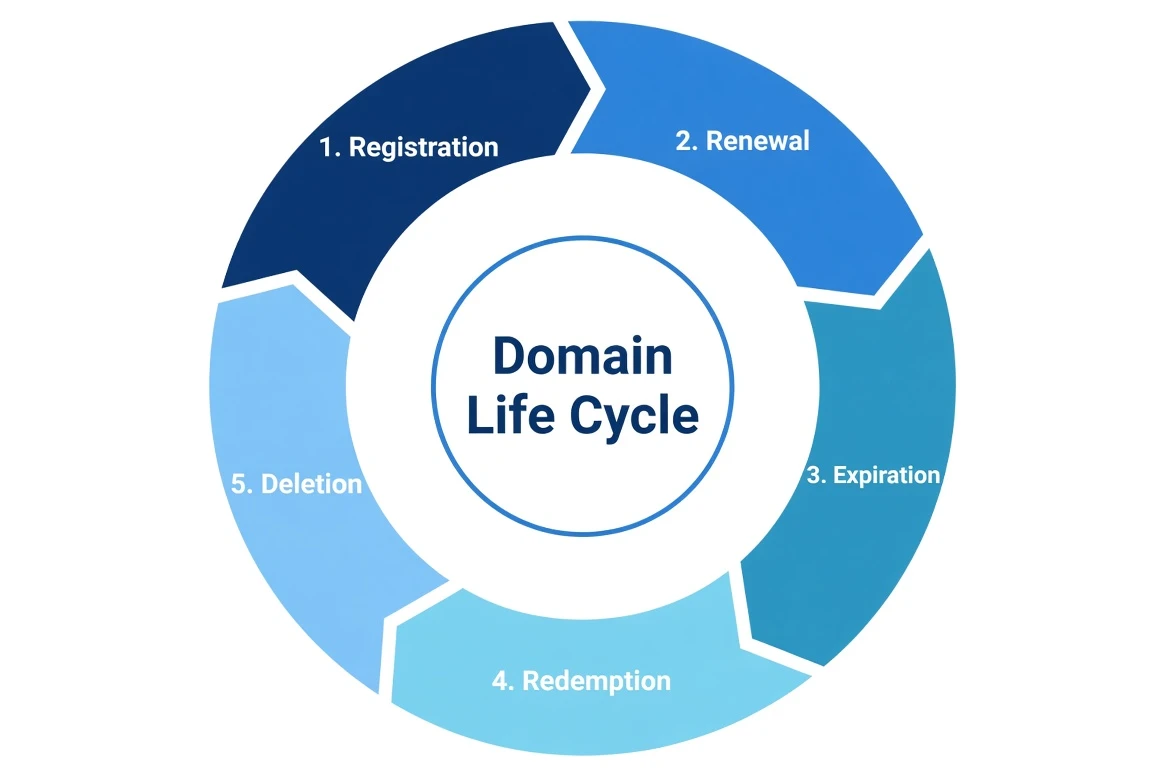
Categories
DNS WHOIS

The Full Lifecycle of an Expiring Domain

A domain doesn’t blink out of existence the day it expires. It falls through a sequence of well-defined stages, each with its own rules about who can recover the name and what it costs. If you’re the owner who forgot to renew, knowing this timeline is the difference between a $10 late renewal and a $200 redemption fee, or losing the name entirely. If you’re trying to acquire an expiring name, it tells you exactly when (and whether) you’ll get a shot.

Here’s the whole path, stage by stage, with the day counts that actually apply to most gTLDs like .com, .net, and .org.

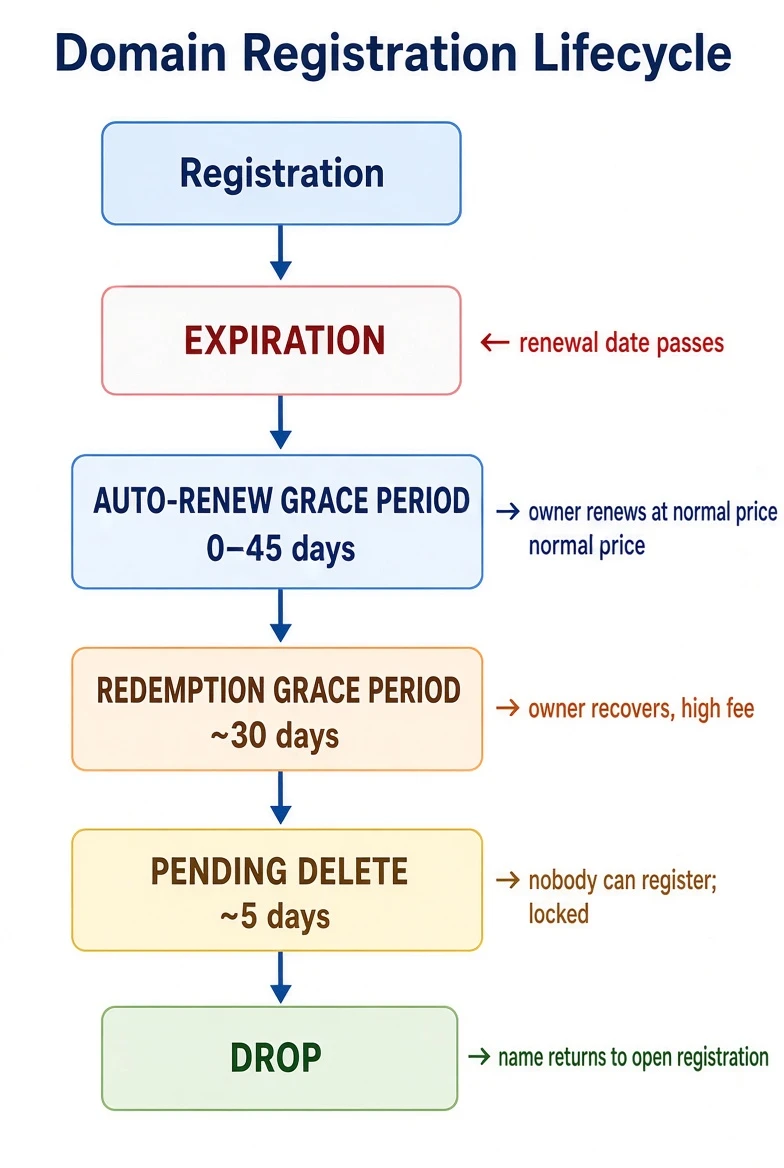
The timeline at a glance

domain registration lifecycle

Stage 1, Expiration and the auto-renew grace period (0–45 days)

The domain’s registration date passes without a renewal. The name doesn’t immediately stop working, and it’s very much still the registrant’s.

  • What happens: Most registrars auto-renew by default, or place the domain into an Auto-Renew Grace Period of up to 45 days (the exact length is set by the registrar within registry rules). During this window the site may keep resolving, or the registrar may park it on a “this domain expired” landing page.
  • Who can recover it: Only the original registrant, and typically at the normal renewal price. This is the cheap, easy window. Renew now and it’s as if nothing happened.
  • The catch: Many registrars start layering on urgency and, near the end of the window, late renewal fees. Don’t count on the full 45 days at base price, check your specific registrar.

If you want the name: you can’t have it yet. It still belongs to the current owner, who holds all the recovery rights.

Stage 2, Redemption Grace Period (~30 days)

If the owner still hasn’t renewed, the registrar deletes the domain from its side, and the registry places it into the Redemption Grace Period (RGP), lasting about 30 days.

  • What happens: The domain stops resolving entirely. DNS is pulled; the site and email go dark. In RDAP/WHOIS the status reads redemptionPeriod.
  • Who can recover it: Still only the original registrant, but now it’s expensive and manual. Recovery means asking the registrar to redeem the name, which usually carries a redemption fee of $80–$200+ on top of the renewal. It’s deliberately punitive; ICANN designed RGP so accidental expirations can be undone, not so names cycle cheaply.
  • Who can’t: No one else. The name is not available to register. Any “backorder” you place is just a queued request for later, you cannot take it now.

This is the last exit for the owner. Miss redemption and the name is effectively gone from your control.

Stage 3, Pending Delete (~5 days)

Redemption lapses. The registry moves the domain to Pending Delete, a fixed period of about 5 days.

  • What happens: The name is locked and inert. Status reads pendingDelete.
  • Who can recover it: Nobody. Not the former owner, not a new registrant. There is no action anyone can take during these five days. It’s a countdown.
  • Why it matters: Pending Delete is the starting gun for the drop-catching industry. Because the period is a fixed length, the exact moment the name will drop is predictable to the second, and that predictability is the whole game for the people who want it.

Stage 4, The Drop

At the end of Pending Delete, the registry deletes the name and returns it to the available pool. In that instant, it’s registrable by anyone on a first-come, first-served basis.

For an unremarkable name, it just quietly becomes available and you can register it normally. For a desirable name, “first come” is a war fought in milliseconds.

Where the name can be recovered vs. caught, the summary

Stage Duration Former owner Anyone else
Auto-renew grace 0–45 days ✅ Recover at normal price ❌
Redemption (RGP) ~30 days ⚠️ Recover, high fee ❌
Pending delete ~5 days ❌ ❌
Drop instant — ✅ First come, first served

The single most useful takeaway: for roughly the first ~75 days after expiry, only the original owner can get the name back. Everyone else is waiting for the drop. If you’re monitoring a name you want, what you’re really tracking is when it will reach the end of pending delete, the only moment it becomes catchable.

Drop-catching: how “first come” really works

When a valuable name drops, thousands of registrations may be attempted in the first second. The players who win are drop-catch registrars, companies that hold many ICANN registrar accreditations specifically so they can fire enormous volumes of registration attempts at the registry the microsecond the name releases. Services like SnapNames, DropCatch, and Pool.com operate exactly this way.

As a normal buyer, you don’t compete with them by hand. You place a backorder with one of these services before the drop. If they catch it and you were the only backorderer, you get it at their base price. If multiple people backordered the same name, it goes to a private auction among those backorderers.

Where auctions come in

There are really two distinct auction markets, and they attach to different points in the lifecycle:

1. Expired-domain auctions (registrar-run, before the drop). This is the big one. Rather than let valuable expiring names fall to third-party drop-catchers, large registrars auction them off during the expiry window, while the name is still technically the lapsed owner’s, in that grace/redemption zone.

  • GoDaddy Auctions is the largest expired-domain marketplace. Names that expire at GoDaddy (and partner registrars) flow into public auctions before they’d ever reach pending delete. Win the auction and GoDaddy renews the name into your account, it never actually drops.
  • Namecheap Market (and its Marketplace/auction features) similarly lists expiring and aftermarket names.
  • Because these auctions capture the name before the public drop, they’re where most genuinely good expiring domains actually change hands. By the time an unremarkable name reaches an open drop, the desirable ones have usually already been auctioned.

2. Aftermarket / listed auctions (owner-initiated, anytime). Separately, current owners list names they choose to sell on marketplaces like Sedo, Afternic, Dan.com, and again Namecheap and GoDaddy’s markets. These have nothing to do with expiry, they’re just a seller meeting a buyer, sometimes via fixed “buy it now” price, sometimes via timed auction.

The practical mental model: desirable expiring names get intercepted by registrar auctions before the drop; only the leftovers reach the true open-registration drop; and separately, owners auction names by choice on the aftermarket at any time.

Putting it to use

  • If you own a name you might let lapse: you have ~45 days at normal price, then ~30 more at a steep redemption fee. After that it’s gone. Don’t rely on the outer edges of those windows, registrar policies vary and fees appear early.
  • If you want to acquire an expiring name: first check whether it’s in a registrar’s expired-domain auction (GoDaddy/Namecheap), that’s where you’ll most likely actually get it. If not, place a backorder and understand you may face a private auction. Only truly unwanted names reach a clean open drop.
  • If you’re monitoring: the signal that matters is the transition into pendingDelete and its ~5-day countdown, which pins the exact drop time.

Every one of these stages is visible in a domain’s registration record. You can watch a name move from active → redemptionPeriod → pendingDelete in real time with a WHOIS lookup, and confirm whether it’s resolving (still live) or dark (past redemption) with a DNS lookup. Watching a whole list of names for the moment they become registrable is exactly what the Bulk Domain Availability Checker and the DomainDuck API are built to automate, poll the list, catch the status change, act on the drop.

Categories
DNS Domains

Does Searching for a Domain Get It Front-Run?

It’s one of the longest-running worries in domain names. You invent the ideal name, drop it into a registrar’s availability checker, confirm it’s free, then pause. A couple of days later you return to buy it and discover it’s already taken, freshly claimed by someone else who’s either parked it or wants a couple thousand dollars for it. The obvious assumption: the search itself tipped someone off.

That practice is known as domain front-running (or domain name front running). Registrars have faced the accusation for nearly twenty years. Is it genuine? Here’s a look at the documented facts versus the folklore.

What “front-running” actually claims

The allegation is specific: someone with access to search or query data, a registrar, a registry, or anyone monitoring the lookup systems, watches which available domains people are checking and registers the interesting ones first. They either hold the name to resell it at a premium to the person who clearly wanted it, or they lock it during a free grace period while deciding whether to keep it.

By searching, the would-be buyer has already revealed interest. Checking a specific available name signals that someone wants it right now, valuable information for any speculator.

The channels people have suspected over the years include:

  1. The registrar’s own search box, the most common accusation.
  2. WHOIS lookups, treating a WHOIS check as a buying signal.
  3. DNS queries, the idea that even a DNS lookup for an unregistered name could be logged and exploited.
  4. Any intermediary along the lookup path that can see the queries.

What’s actually documented

The evidence is mixed: one confirmed mechanism, widespread denials, and a clear structural incentive.

The confirmed mechanism: Domain tasting (now largely gone). For years a systemic loophole made speculative registration almost free: the Add Grace Period (AGP), a roughly five-day window after registration during which a domain could be deleted for a full refund. Speculators registered huge numbers of names, drawn from expired-domain lists, search trends, and typo patterns, held each for a few days to measure type-in traffic, and refunded the losers. This practice, called domain tasting, was widespread and thoroughly real.

Domain tasting is the closest thing to confirmed front-running behavior in this story, and it was deliberately shut down. Around 2008–2009 ICANN changed the rules so that AGP refunds were no longer free at scale: registrars now pay the ICANN transaction fee on domains deleted during the grace period once they exceed a small threshold. Once every speculative registration carried a real cost instead of being fully refundable, the economics collapsed and mass tasting essentially ended. This episode proves the incentive to act on registration signals was strong enough to support an industry, and that removing the free-refund loophole is what stopped it.

The registrar accusations: mostly denied, one well-known case. The highest-profile example involved Network Solutions around 2008. Users noticed that domains they had searched on the Network Solutions site were being registered by Network Solutions itself and held for a time. The company acknowledged the practice but described it as defensive: it claimed it was protecting customers from third-party front-running by temporarily reserving the searched name so no one else could grab it. If the customer didn’t buy within a few days, the name was released. Critics viewed it as a registrar using search data for its own advantage under the guise of customer protection; Network Solutions presented itself as the solution. Either interpretation confirms one fact: in at least one documented instance, searched-but-unpurchased names were being registered on the basis of the search itself.

ICANN’s review. ICANN’s security committee (SSAC) looked into domain front-running and issued report SAC 022. It recognized the concern and the technical plausibility of the mechanism, while observing that conclusive, industry-wide proof of registrars secretly mining search data was difficult to establish. The conclusion was neither “pure myth” nor “rampant abuse,” but rather that the incentive and certain channels exist while broad systematic evidence remains elusive.

Ordinary explanations that cover many “front-running” stories. Not every disappearing name is the result of foul play. Several everyday factors produce the same experience:

  • Genuine coincidence and independent demand. Attractive names are checked by many people. If a name is clearly valuable, another party wanting it is expected rather than suspicious. The better the name, the more likely others were already looking at it.
  • Bulk speculators working from public data, not your individual search, expiring-domain lists, trend feeds, dictionary sweeps. They register large batches of plausible names programmatically; yours may simply have been caught in a net unrelated to your lookup.
  • Confirmation bias and small samples. People vividly remember the one time a searched name vanished; they forget the hundreds of times a searched name remained available for months. One memorable coincidence outweighs many non-events in memory.

So, is it real?

Before assessing the evidence, consider whether the infrastructure could even support the conspiracy. DNS resolvers handle trillions of queries daily, and a large fraction are for names that do not exist: typos, outdated configurations, mail servers chasing dead MX records, crawlers, security scanners, and malware that deliberately generates thousands of disposable hostnames. WHOIS and RDAP traffic follows a similar pattern on a smaller scale, dominated by automation. Brand-monitoring tools, threat-intelligence platforms, availability checkers, and bulk scripts testing dictionary combinations make up the vast majority of lookups. Actual humans choosing a business name are a tiny fraction of that volume.

For a speculator, this is noise rather than a clean data feed. To make money they would need to isolate the queries that reflect a real person with genuine intent and real purchasing power, act quickly, and be correct often enough to cover costs. Once registrations stopped being refundable, every incorrect guess became an actual expense. Even a few-percent hit rate against that volume would lose money. The infrastructure is also far more fragmented than the theory requires: DNS is spread across countless resolvers, and WHOIS/RDAP responses come from different registries and registrars depending on the TLD, most of them rate-limited and, after GDPR, increasingly restricted. No single party enjoys the comprehensive vantage point the conspiracy assumes.

The registrar search box is a different matter, which is why suspicion centers there and largely belongs there. That query is not noise; it is pre-qualified. Someone deliberately typed a brandable name into a tool designed to sell domains, often while logged in, often after trying several variations of the same idea. Intent is clear, the searcher can be identified, and the party seeing the query is the one that can register the name instantly at wholesale cost and then offer it back to someone already known to want it. Every element missing from the DNS and WHOIS theories, high-quality signal, attribution, means, and a ready buyer, is present at once.

How to protect yourself if you’re concerned

Regardless of whether any particular disappearance was front-running, the practical defenses are straightforward and cost nothing except discipline:

  1. If you’re certain, register it immediately. The strongest protection is simple: don’t leave a name you’ve decided on sitting in a search box for days. A .com is inexpensive. The gap between “I want this” and “I own this” is the entire window of exposure, close it. Register first, refine later.

  2. Check availability outside a registrar’s sales funnel. You don’t need to search on the site where you intend to buy. Use a neutral, non-registrar lookup that has no incentive to claim the names you check, a plain WHOIS lookup or an authoritative RDAP query shows registration status without feeding your interest into a sales system. DomainDuck is a tooling provider, not a registrar competing for names, so checking there does not feed a registration engine.

  3. Prefer authoritative status over the registrar search box. A WHOIS or RDAP check answers “is it registered?” directly. If you need to know where to query for a particular TLD, Get WHOIS server from TLD and Get RDAP server from TLD point you to the correct source.

  4. Batch your decisions. When evaluating multiple candidate names, check them together and register the finalists in one session rather than searching one, thinking it over, then searching another across several days. The longer a list of “searched but still unregistered good names” remains exposed, the greater the chance that coincidence or a real signal will intervene. A Bulk Domain Availability Checker lets you screen the entire shortlist at once so you can move straight to registration.

  5. Avoid over-signaling. Don’t publicly discuss an exact unregistered name you want (on social media, forums, etc.) before you own it, that is a far more reliable leak than any search box.

The bottom line

The dramatic claim that “every search box has a speculator watching” is overstated, and the most profitable historical form of the practice was deliberately dismantled. Yet the underlying reality remains solid enough to act on: searching discloses intent, and a genuinely attractive available name is a target for reasons that have nothing to do with your particular search. The sensible response is not paranoia about search boxes. Check with a neutral tool, decide, and register. The only name that cannot be front-run is the one you already own.

Categories
Domains WHOIS

WHOIS Protocol: 20 Questions & Answers

1. What is the WHOIS protocol?

WHOIS is a query/response protocol used to retrieve registration and ownership information for Internet resources such as domain names, IP address blocks, and autonomous system numbers. It operates as a simple text-based service, typically over TCP port 43.

2. On which port does the WHOIS protocol run by default?

Port 43 (TCP). This is the standard IANA-assigned port for WHOIS services.

3. What does a typical WHOIS query look like?

A simple text command sent to a WHOIS server, e.g.:

whois example.com

or directly via telnet/netcat:

echo "example.com" | nc whois.iana.org 43

4. What are the main RFCs that define the WHOIS protocol?

  • RFC 3912 (2004) – WHOIS Protocol Specification (current standard).
  • Earlier documents include RFC 954 (1985) and RFC 812.

5. What information does a domain WHOIS record typically contain?

Registrar, registration dates (creation, update, expiration), name servers, registrant contact data (name, organization, address, email, phone), and sometimes technical/administrative contacts.

6. What is the difference between “Thick” and “Thin” WHOIS?

  • Thick WHOIS: The registry holds the full record (including registrant contact data).
  • Thin WHOIS: The registry only holds basic info (registrar, name servers, dates); full contact data is held by the registrar.

7. How does WHOIS differ from RDAP?

RDAP (Registration Data Access Protocol) is the modern successor to WHOIS. It uses HTTPS, supports structured JSON data, authentication, internationalization, and better access control, whereas WHOIS is an older, plain-text protocol.

8. Who operates WHOIS servers?

Domain registries (e.g., Verisign for .com, PIR for .org), registrars, and regional internet registries (RIRs) such as ARIN, RIPE NCC, APNIC, etc., for IP addresses and ASNs.

9. What is the IANA WHOIS server used for?

whois.iana.org serves as a root server that redirects queries to the appropriate TLD-specific or RIR-specific WHOIS server.

10. How has GDPR affected WHOIS data?

Since 2018, GDPR has led to significant redaction of personal data (name, address, phone, email) in public WHOIS records for European registrants, replacing it with anonymized or privacy-protected contact information.

11. What command-line tools are commonly used for WHOIS queries?

  • whois (standard Unix/Linux tool)
  • dig (for some DNS-related info)
  • Third-party clients such as whois-client, JWhois, or online services like whois.com, icann.org lookup.

12. What is a WHOIS referral?

When a WHOIS server does not have the authoritative data, it returns a referral to another server that does (e.g., from IANA to a specific registrar server).

13. Can you query IP address blocks with WHOIS?

Yes. Regional Internet Registries (RIRs) maintain WHOIS databases for IPv4/IPv6 allocations. Example: querying ARIN for an IP range returns organization, net range, and abuse contact information.

14. What are common limitations of the WHOIS protocol?

  • Lack of standardized output format
  • Rate limiting and abuse prevention
  • No built-in security or encryption
  • Inconsistent data quality across registries
  • Poor support for internationalized domain names (IDNs) in older implementations

15. How do you query a specific WHOIS server?

Use the -h flag with most whois clients:

whois -h whois.verisign-grs.com example.com

16. What is the “registrar WHOIS” vs “registry WHOIS”?

  • Registry WHOIS: Operated by the TLD registry (e.g., Verisign for .com).
  • Registrar WHOIS: Operated by the accredited registrar that sold the domain to the end user.

17. Is WHOIS data real-time?

No. There is often propagation delay (minutes to hours) between changes in the registry database and when they appear in public WHOIS responses.

18. What organizations oversee WHOIS policy?

ICANN (Internet Corporation for Assigned Names and Numbers) sets policy for gTLD WHOIS/RDAP requirements through contracts with registries and registrars.

19. Give an example of a basic WHOIS response structure.

Typical fields include:

Domain Name: EXAMPLE.COM
Registrar: Example Registrar, Inc.
Creation Date: 1995-08-13T00:00:00Z
Registry Expiry Date: 2026-08-12T23:59:59Z
Name Server: NS1.EXAMPLE.COM
...

20. What is the future of the WHOIS protocol?

ICANN and the industry are transitioning toward RDAP as the primary protocol. WHOIS is considered legacy and will likely be phased out or kept only for backward compatibility due to its security and privacy limitations.

Categories
DNS Domains

Most common DNS servers

Here are some of the most common and widely used public DNS servers in 2026:

Top Public DNS Resolvers

Provider Primary DNS Secondary DNS Best For Notes
Cloudflare 1.1.1.1 1.0.0.1 Speed + Privacy Often the fastest globally, strong privacy policy, supports DNS-over-HTTPS (DoH) and DNS-over-TLS (DoT).
Google Public DNS 8.8.8.8 8.8.4.4 Reliability & Global Reach Very stable, huge infrastructure, one of the most popular choices.
Quad9 9.9.9.9 149.112.112.112 Security & Malware Blocking Blocks malicious domains by default, privacy-focused.
OpenDNS 208.67.222.222 208.67.220.220 Content Filtering & Customization Good for families or businesses (parental controls available).

Other Notable DNS Servers

  • AdGuard DNS — Good for ad and tracker blocking.
  • CleanBrowsing — Family-friendly with strong content filtering.
  • NextDNS or Control D — Highly customizable (great if you want advanced features).

Quick Tips

  • Your ISP’s default DNS is the one your router uses automatically, but it’s often slower and less private than the public options above.
  • Many people switch to Cloudflare (1.1.1.1) or Google (8.8.8.8) for better speed and reliability.
  • For maximum privacy, look for resolvers that support DoH or DoT (encrypted DNS).
Categories
DNS Domains

DNS and Domain Names: 20 Questions & Answers

1. What is DNS?

DNS (Domain Name System) is like the phonebook of the internet. It translates easy-to-remember domain names (like example.com) into IP addresses that computers use to load websites. When you type a domain name, DNS looks it up through a series of servers and directs your browser to the right place.

2. How long does DNS propagation take after changing domain settings?

DNS propagation usually takes anywhere from a few minutes to 48 hours. It depends on the TTL (Time to Live) value you set and how long caching servers worldwide hold onto the old records for your domain name.

3. Why is my domain name not working or resolving?

If your domain isn’t loading, it’s often a DNS issue. Common causes include incorrect nameserver settings, wrong DNS records, expired domains, or propagation delays still showing old information.

4. How do I change the DNS nameservers for my domain?

You can change nameservers through your domain registrar’s control panel. This tells the global DNS system which servers should handle all the records for your domain name.

5. What are the most important DNS records for a domain name?

The most critical DNS records are A/AAAA (for pointing to your website’s IP), MX (for email), CNAME (for aliases), and TXT (for verification and security). These records control how your domain behaves.

6. How do I check DNS records for my domain name?

You can check DNS records using tools like dig, nslookup in the command line, or free online checkers such as WhatsMyDNS, MXToolbox, or Google’s DNS lookup. These show exactly what the DNS system sees for your domain.

7. What is DNS propagation and why does it take so long?

DNS propagation is the process of your updated domain records spreading to DNS servers around the world. It takes time because servers cache the old data until the TTL expires.

8. How can I speed up DNS resolution for my domain?

You can speed up DNS by using a low TTL, choosing fast public DNS resolvers (like Google 8.8.8.8 or Cloudflare 1.1.1.1), enabling DNS caching properly, and using a reliable DNS provider with good global reach.

9. What is the difference between a domain name and DNS?

A domain name is the web address you register (like yoursite.com). DNS is the technology and system that makes that domain name work by connecting it to the correct servers and IP addresses.

10. How do I point my domain name to a new website using DNS?

To point your domain to a new site, you update the A or AAAA records in your DNS settings to the new server’s IP address. You may also need to adjust CNAME records for subdomains.

11. Should I enable DNSSEC for my domain name?

Yes, enabling DNSSEC is recommended for most domains. It adds a layer of security by digitally signing your DNS records, protecting visitors from DNS spoofing and man-in-the-middle attacks.

12. What are the best DNS servers for my domain in 2026?

Popular fast and private options include Cloudflare (1.1.1.1), Google Public DNS (8.8.8.8), Quad9 (9.9.9.9), and OpenDNS. Many people also use their domain registrar’s or hosting provider’s DNS.

13. How does DNS affect my website loading speed?

Every time someone visits your domain, DNS lookup time adds to the total loading speed. Slow or distant DNS servers can delay the first connection, which is why fast anycast DNS networks are important.

14. Why would I use Cloudflare DNS for my domain?

Cloudflare DNS is popular because it’s extremely fast, free, secure (with DNSSEC), and includes features like DDoS protection and analytics. It also offers DNS management that’s easy to use.

15. How do I set up email for my custom domain using DNS?

You need to add MX records in your DNS settings that point to your email provider (Google Workspace, Microsoft 365, etc.). SPF, DKIM, and DMARC TXT records are also added to improve deliverability.

16. What causes DNS errors and how do I fix them?

Common DNS errors come from misconfigured records, nameserver problems, cache issues, or server downtime. Fixing usually involves double-checking records, flushing your local DNS cache, and waiting for propagation.

17. How can I flush the DNS cache on my computer?

On Windows you run ipconfig /flushdns in Command Prompt. On Mac you use sudo dscacheutil -flushcache and on Linux sudo systemd-resolve --flush-caches. This forces fresh DNS lookups for domain names.

18. Can the same domain name point to different servers with DNS?

Yes. Using DNS load balancing, GeoDNS, or multiple A records, one domain name can direct users to different servers based on location, server load, or other rules.

19. What happens to DNS when a domain name expires?

When a domain expires, its DNS records eventually stop working. The domain may go into a grace period, then redemption, and finally become available for re-registration. During this time the site and email usually go offline.

20. What are common best practices for managing DNS for a domain name?

Use a reputable DNS provider, enable DNSSEC, keep records clean and documented, set reasonable TTL values, monitor for changes, and always have SPF/DKIM/DMARC set up for email security.

Categories
Domain history Domain market

Top 10 most expensive domain names ever sold

The most expensive domain names ever sold represent the pinnacle of digital real estate. Premium domains—especially short, keyword-rich .coms—have fetched astronomical prices due to their branding power, traffic potential, and scarcity.

While many sales remain private under NDAs, publicly reported or verified deals (from sources like DNJournal, NameBio, Wikipedia, and industry reports as of March 2026) show staggering figures. Note that some “sales” (like Cars.com) were part of larger company acquisitions where the domain’s value was a major factor.

Here are the top 10 most expensive domain names ever sold (all-time, adjusted for reported nominal prices):

  1. Cars.com — $872 million (2014)
    Part of Gannett’s acquisition of Classified Ventures. This domain powered a leading auto marketplace and remains the undisputed record-holder for domain valuation in a corporate deal.
  2. Business.com — $345 million (2007)
    Sold during the pre-recession boom as part of an acquisition where the domain’s stock valuation drove the price. It was a massive bet on B2B online advertising.
  3. LasVegas.com — $90 million (2005)
    Acquired by the city of Las Vegas (via Stephens Media Group) in a long-term payment deal. A prime example of a geographic domain capturing massive tourism traffic.
  4. AI.com — $70 million (2025)
    Purchased by Crypto.com founder Kris Marszalek. The explosive rise of AI branding made this ultra-short, premium name the biggest pure domain sale in recent history.
  5. CarInsurance.com — $49.7 million (2019)
    Bought by QuinStreet, a digital marketing firm specializing in insurance leads. High-search-volume keywords like this drive enormous affiliate revenue.
  6. Insurance.com — $35.6 million (2010/2020 reports vary, but confirmed high)
    Also acquired by QuinStreet. Another insurance powerhouse domain demonstrating the sector’s willingness to pay for direct traffic.
  7. VacationRentals.com — $35 million (2007)
    Purchased by HomeAway (now Vrbo) reportedly to block competitors like Expedia. It later redirected to their platform.
  8. PrivateJet.com — $30.18 million (2012)
    Sold to Don’t Look Media. Luxury travel keywords continue to command premiums.
  9. Voice.com — $30 million (2019)
    Acquired by Block.one (EOS blockchain). A short, versatile name ideal for tech/voice services.
  10. Internet.com — $18 million (2009/2010s)
    Bought by QuinStreet again. An ultra-generic, high-authority name in the early web era.

Honorable Mentions & Recent Highs

  • Chat.com — $15.5 million (2023) — AI/chat tech boom beneficiary.
  • NFTs.com — $15 million (2022) — Peak crypto/NFT hype.
  • Rocket.com — $14 million (2024) — Modern brandable sale.
  • Sex.com — $13–14 million (multiple sales: 2005 & 2010) — The infamous adult industry classic.
  • Icon.com — $12 million (2025) — Recent single-word .com blockbuster.

Why These Prices?

Domains like these act as digital billboards: they deliver instant trust, SEO advantages, type-in traffic, and brand recall. In industries like insurance, finance, travel, and emerging tech (AI, crypto), owning the exact-match keyword can generate millions in revenue annually—making multimillion-dollar buys a smart investment.

The market evolves fast—2025–2026 saw AI-themed domains surge (e.g., Bot.ai at $1.2M), but classic .coms still dominate the all-time list.

Curious about a domain’s potential value? Tools like free appraisals and availability checkers can give quick insights into whether your idea could join this elite club someday.

Categories
Domain history Domain market

The Wild History of Domain Names: From free registrations to million-dollar sales

The wild history of domain names reads like a tech adventure story: from humble, free academic beginnings to a multi-billion-dollar digital real estate market where single words—or even two letters—fetch tens of millions. What started as a simple way to map memorable names to numeric IP addresses has become a cornerstone of online identity, branding, investment, and now AI-driven innovation.

Let’s travel back through the key milestones, with updated details as of March 2026.

The Dawn: DNS and the very first domains (1980s)

The Domain Name System (DNS) was invented in 1983 by Paul Mockapetris to replace the cumbersome manual host files that were becoming impossible to manage as the internet grew from a small research network to something much larger. Before DNS, every computer on the ARPANET (the internet’s precursor) relied on a centrally updated “hosts.txt” file—imagine manually syncing a text file across thousands of machines. DNS introduced a hierarchical, distributed database that translates human-readable names (like example.com) into IP addresses automatically.

By 1985, the internet’s foundational generic top-level domains (gTLDs) were live: .com for commercial entities, .org for organizations, .net for networks, .edu for educational institutions, .gov for U.S. government, and .mil for U.S. military. Country-code TLDs (ccTLDs) like .uk (United Kingdom), .de (Germany), and .se (Sweden) followed soon after to support international growth.

The absolute first domain ever registered was nordu.net on January 1, 1985, for the Scandinavian research network NORDUnet, connecting universities across the Nordic countries. But the one most remembered as the symbolic first .com is symbolics.com, registered on March 15, 1985, by Symbolics Inc., a Massachusetts-based company specializing in Lisp machines—early specialized computers used for artificial intelligence research.

This wasn’t a public spectacle or auction—just routine administrative work among universities, defense contractors, and pioneering tech firms. Other early registrations included bbn.com (Bolt, Beranek and Newman, a key internet infrastructure player) and berkeley.edu in April 1985, followed by xerox.com, dec.com (Digital Equipment Corporation), and mit.edu.

Registrations were completely free and handled by government-funded entities like InterNIC under the National Science Foundation (NSF). No one foresaw the commercial explosion. Even iconic modern names like google.com arrived much later—registered on September 15, 1997, after the founders briefly considered “googol.com” for their search engine inspired by the mathematical term for a 1 followed by 100 zeros.

The shift to paid: Commercialization in the 1990s

As the World Wide Web popularized the internet beyond academia and defense in the early 1990s, demand for memorable names surged. Network Solutions Inc. (NSI) held a monopoly on .com, .net, and .org registrations through its NSF contract.

The game-changer arrived in September 1995: overwhelmed by explosive growth, the NSF ended free subsidies. NSI introduced fees—$100 for two years (about $200 in today’s inflation-adjusted dollars). Domains transformed from technical curiosities into paid assets with real economic value.

This sparked the dot-com boom. Registrations exploded from tens of thousands in the mid-90s to millions by 2000. Companies rushed to claim exact-match brand names, often for minimal cost compared to future resale values.

A quirky milestone: All possible three-letter .com combinations (17,576 total, from aaa.com to zzz.com) were fully registered by around 2000. Today, these short, versatile names are ultra-premium resale items, frequently trading for six or seven figures on secondary markets.

The boom, bust, and billion-dollar deals (2000s–2010s)

The early 2000s turned domain speculation into a full-fledged industry—often called “domain flipping.” Investors registered thousands of names anticipating corporate demand, leading to headline-grabbing sales:

  • Sex.com sold for $13 million in 2010 (following earlier drama, including a $14 million deal in 2005 and legal battles over ownership).
  • Fund.com fetched nearly $10 million in 2008.
  • Cars.com was valued at $872 million in 2014 (as part of a larger Gannett acquisition of Classified Ventures, where the domain was the primary asset driving the price).
  • Business.com went for $345 million in 2007 (including the associated business site, one of history’s largest domain-inclusive deals).
  • LasVegas.com sold for $90 million in 2005 (with payments spread over years, capitalizing on massive tourism traffic).
  • CarInsurance.com hit $49.7 million in 2019.
  • Voice.com reached $30 million in 2019.

These weren’t vanity buys. Premium domains provided instant credibility, massive organic search traffic, superior click-through rates, and strong SEO advantages—often recouping costs through revenue many times over.

The 2000 dot-com bust temporarily cooled speculation, but the market rebounded stronger, proving domains as resilient digital real estate.

Today in 2026: AI fuels explosive new records

As of early 2026, the global total stands at approximately 386.9 million registered domains (per the Domain Name Industry Brief for Q4 2025, with steady Q1 2026 growth continuing the upward trend). .com remains dominant with around 160 million registrations (combined .com/.net at ~173.5 million), but diversification is accelerating.

ICANN’s 2012 new gTLD program introduced hundreds of niche extensions like .app, .io, .tech, .blog, .shop, and .online—many now mainstream for startups and brands. Country-code TLDs have surged, especially .ai (Anguilla’s ccTLD), which exploded amid the AI revolution. Short, keyword-rich .ai domains command six- and seven-figure prices due to perfect thematic fit, scarcity, and hype.

The AI boom has shattered records:

  • AI.com sold for $70 million in April 2025 (publicly confirmed February 2026 via broker GetYourDomain.com—the largest publicly reported domain transaction ever, more than doubling the prior $30 million benchmark for Voice.com. Buyer: Kris Marszalek, CEO of Crypto.com, who launched an AI-powered platform with a high-profile Super Bowl ad debut).
  • Bot.ai fetched $1.2 million (Sedo, February/March 2026—the first publicly reported seven-figure .ai sale and the highest .ai transaction on record).
  • Other notable 2025–2026 sales: Lotus.ai ($400,000), Midnight.com ($1.15 million), Surface.ai ($110,000), Commerce.com ($2.2 million), Fuse.com ($2.13 million), and PrivateLLM.com ($250,000).

The market thrives on scarcity (short names are nearly exhausted in .com), brandability, memorability, exact-match keywords, and cultural/tech trends. AI-related names are the hottest category, with speculation driving premiums as companies position for the AI economy.

Crazy historical domain name fails: when giants dropped the ball

The domain name world isn’t just about blockbuster sales and savvy investments—it’s also littered with epic blunders that left companies red-faced, offline, or the punchline of internet jokes for years. From forgetting to renew million-dollar assets to choosing names that unintentionally read like something far more scandalous, these fails remind us that even the biggest players can make hilariously costly mistakes. Here are some of the most infamous ones.

Some of the most legendary domain fails stem from simple word-mashing without considering how the URL reads without spaces or capitalization. These became instant memes and still get trotted out in “worst domain names” lists decades later:

  • penisland.net — Intended as “Pen Island,” a site for selling high-quality pens. Without spaces, it becomes “Penis Land,” turning a innocent stationery shop into an accidental adult site joke. The domain has lived on in infamy, with the owners reportedly leaning into the notoriety for traffic.
  • expertsexchange.com — Meant to be “Experts Exchange,” a legitimate Q&A forum for IT professionals (now experts-exchange.com with a hyphen). Read quickly, it suggests something entirely different and far less professional. The company eventually added a hyphen to clarify, but the original version remains a hall-of-fame embarrassment.
  • whorepresents.com — A talent agency database for “Who Represents?” celebrities and brands. The mashed-up version reads as “whore presents,” leading to endless snickers despite the site’s legitimate purpose.
  • therapistfinder.com — A directory for finding therapists. Without careful reading, it looks like “the rapist finder”—a horrifying twist on what was supposed to be a helpful resource.
  • speedofart.com — An art directory meant as “Speed of Art.” It quickly became “speedo fart” in the eyes of the internet, proving that even creative names can backfire spectacularly.

These “no-space disasters” highlight a key lesson: always read your domain out loud, without breaks, and test it on friends who aren’t in on the joke.

Expiration nightmares: Forgetting to renew and watching chaos ensue

Forgetting domain renewal is one of the most common—and expensive—blunders. When auto-renew fails or someone overlooks a bill, entire businesses go dark, often for days, while squatters or pranksters swoop in.

  • Foursquare’s Epic Drop (2010s) — The location-based social app, fresh off raising $10 million in funding, let foursquare.com expire. The entire service went offline as the domain lapsed, turning a hot startup into a cautionary tale. They scrambled to regain control, but the downtime damaged credibility at a critical growth moment.
  • Microsoft’s Multiple Lapses (Late 1990s–Early 2000s) — Even tech titans aren’t immune. In 1999, Microsoft forgot to renew passport.com (a key authentication domain), causing widespread access issues. Hotmail.co.uk also expired briefly in 2003, making headlines and giving Linux fans endless ammo to mock the giant.
  • Dallas Cowboys Fumble (2010) — During a dismal season, the NFL team let dallascowboys.com expire. The site went dark for 24–28 hours, replaced by a placeholder image of kids playing soccer—a brutal irony for America’s Team. They regained it quickly, but the embarrassment lingered.
  • Regions Bank Blackout (2013) — The major U.S. bank forgot to renew regions.com, taking their site offline and locking customers out of online banking across multiple states. It was a PR disaster for a financial institution.
  • Google’s $12 Glitch (2015) — In a surreal twist, former Googler Sanmay Ved discovered google.com listed as available on Google Domains and bought it for $12 due to a renewal lapse. Google quickly reversed it and rewarded him, but it exposed how even the search king could slip up on its own crown jewel.

These expirations often stem from poor processes—no automated reminders, siloed responsibilities, or overlooked grace periods—proving that “set it and forget it” doesn’t apply to digital real estate.

Missed opportunities and squatter battles

Some companies failed to secure their obvious domains early, leading to costly fights or permanent workarounds:

  • Early brands like MTV battled ex-employees (Adam Curry registered mtv.com personally before the company cared about the web), ending in lawsuits.
  • Nissan fought a small businessman (Uzi Nissan) over nissan.com, settling for nissanusa.com after years of litigation.
  • Heinz ketchup once let heinz.com lapse, only for a porn site to snag it briefly—leading to awkward apologies.

These cases show how failing to claim (or defend) your brand name early can turn into multimillion-dollar headaches.

In the end, these crazy fails underscore a timeless truth in the domain world: a great name is powerful, but a bad one—or losing it—can haunt you forever. Always double-check availability, renewals, readability, and cultural connotations. The internet never forgets… and it loves a good laugh at big mistakes.

Why this history still matters, And what’s next

Domain names evolved from free technical conveniences into powerful, appreciating digital assets. A strong one instantly builds trust, drives traffic, enhances SEO, strengthens branding, and can serve as a long-term investment or flip opportunity.

Curious about your own ideas? Tools like bulk availability checkers (e.g., on GoDaddy or Namecheap), AI-powered appraisal estimators, WHOIS lookups, and marketplaces (Sedo, GoDaddy Auctions, Afternic) make exploration instant and data-driven—no more blind registrations.

The ride isn’t slowing. With AI agents potentially handling more web interactions, Web3/blockchain domains gaining traction, and ICANN’s next new gTLD application round expected in 2026 (potentially adding hundreds more extensions), scarcity and innovation will push values higher. Premium .coms remain king for credibility, but .ai and emerging niches offer explosive upside.

9fc8a693619ed876